Overview
WordPress For Beginners introduces learners to the core structure of WordPress through a guided starter pathway. This course explains account creation, dashboard navigation, and foundational setup tasks using a clear curriculum-led approach. WordPress For Beginners focuses on early-stage familiarity, ensuring learners recognise key features, layout elements, and platform purpose. Through this introduction, WordPress For Beginners prepares learners to move confidently into website creation while avoiding confusion often faced at the start.
Course Description
Creating a website should feel exciting, not overwhelming. This WordPress For Beginners Course opens the door to digital creation by guiding learners through essential starting elements in a structured, reassuring way. From the first login to recognising dashboard functions, the course builds clarity and direction. As a result, learners see how WordPress supports blogs, business sites, and portfolios without complexity.
Furthermore, this WordPress For Beginners Course presents WordPress as an accessible platform rather than a technical barrier. Each curriculum section flows logically, allowing learners to move forward without pressure. Meanwhile, clear demonstrations replace guesswork, enabling progress without frustration. Consequently, learners develop confidence while navigating tools and settings from the outset.
Most importantly, this WordPress For Beginners Course supports long-term growth. Instead of overwhelming detail, it prioritises clarity and usability. Therefore, learners remain motivated while building familiarity that supports future development. By the end, WordPress feels structured, navigable, and purposeful, encouraging learners to continue building independently.
Note: Skill-up is a Janets-approved resale partner for Quality Licence Scheme Endorsed courses.
Key Benefits
- Builds platform confidence from the very first login
- Supports independent website setup progression
- Encourages structured navigation familiarity
- Reduces beginner confusion through guided flow
- Provides free certification for credibility
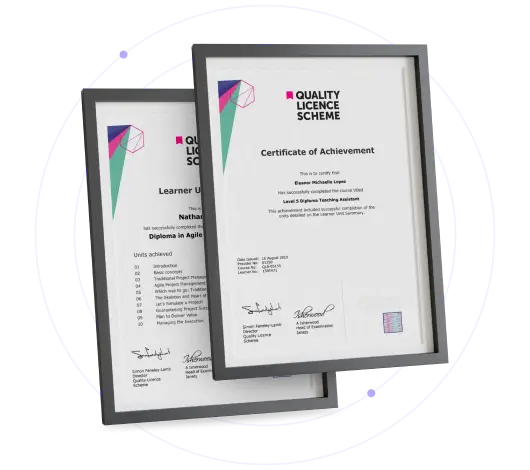
Certificate of Achievement
Free QLS Certificate Included
Quality Licence Scheme Endorsed Certificate
Upon completing the final assessment, you can apply for the Quality Licence Scheme Endorsed Certificate of Achievement. Endorsed certificates can be ordered and delivered to your home by post.
An extra £10 postage charge will be required for students leaving overseas.
Skill Up Recognised Certificate
Upon successfully completing this course, you can request a Skill Up Recognised Certificate. This certificate holds significant value, and its validation will endure throughout your lifetime.
1. PDF Certificate + PDF Transcript: FREE With This Course
2. Hard Copy Certificate + Hard Copy Transcript: £19.99
3. Delivery Charge: £10.00 (Applicable for International Students)
Note: There are no discount coupons available for this course at the moment.
Learning Outcome
- Navigate the WordPress dashboard efficiently
- Identify core website setup components
- Recognise essential platform tools
- Prepare a WordPress account correctly
- Establish a foundation for future site creation
Who Is This Course For?
- Individuals exploring website creation
- Beginners seeking structured WordPress entry
- Freelancers starting online portfolios
- Small business owners building presence
- Learners wanting certified starter training
Career Path
- WordPress Assistant – £22,000–£28,000
- Content Editor – £24,000–£32,000
- Junior Web Administrator – £26,000–£35,000
- Website Support Executive – £28,000–£38,000
- Digital Content Coordinator – £30,000–£42,000
Frequently Asked Questions
WordPress For Beginners Course introduces WordPress setup, navigation, and starter tools for learners creating websites from scratch.
Yes, WordPress For Beginners focuses on early-stage guidance without assuming prior website knowledge.
Yes, learners receive a free certificate after completing the Course.
Completion time depends on learning pace; however, the structured curriculum allows steady progress.
Yes, WordPress For Beginners supports entry-level digital and website roles across UK industries.
Curriculum
-
Introduction to WordPress in 1 Hour: Quick and Easy Essentials for Beginners
00:02:00
-
WordPress.com vs. WordPress.org? How to Get Set Up and What You Need
00:02:00
-
Have Your WordPress Login Information? Let’s Get Started!
00:02:00
-
Tour the WordPress Dashboard
00:02:00
-
How to Make (or Edit) a Post in WordPress
00:08:00
-
How to Make a Page in WordPress ( & The Difference Between a Page and a Post)
00:02:00
-
The Rundown on WordPress Plugins
00:07:00
-
All About WordPress Themes
00:05:00
-
Fun With WordPress Widgets
00:04:00
-
Setting Up or Editing Menus in WordPress
00:03:00
-
How to Use Your Tools in WordPress
00:01:00
-
How to Be the Boss of Your WordPress Settings
00:04:00
-
Adding or Editing Links in WordPress
00:03:00
-
Managing Users and Permissions in WordPress
00:04:00
-
Conclusion
00:03:00
-
New Case Study: How to Use Color Psychology to Boost Your Website
00:12:00
-
Submit Your Assignment & Order QLS Certificate
Offer Ends in
14-Day Money-Back Guarantee
-
Duration:Self-paced Learning
-
Access:1 Year
-
Units:17

6 Reviews