Overview
How do content creators, designers, and digital marketers turn ordinary visuals into animations that grab attention and keep audiences engaged?
Today, static content is often easy to overlook. Motion now plays a major role in digital communication. It may appear as a short GIF, a looping visual, or a stylised animation. Either way, it helps ideas feel clearer, more engaging, and more memorable across online platforms. For creative beginners and professionals, animation can open new ways to express ideas and stand out.
This 2D Animation Course Online UK is designed for learners who want a structured and flexible animation course online UK with certification. Using Photoshop as your creative workspace, you will explore frame-by-frame techniques, rotoscoping, motion effects, and GIF creation. You will also see how images and video can become animated content. Whether you want to build a creative portfolio or improve digital content skills, this course supports your first confident step into animation.
Course Description
This photoshop animation course gives you a clear introduction to creating animation in a familiar design workspace. It starts by showing how Photoshop can support more than static visuals. You will see how it helps with multimedia work, visual storytelling, and digital content creation. You will also explore how to source suitable video materials. This includes royalty-free and public domain resources, so your creative work stays effective and responsible.
Next, you will build your animation workflow step by step. You will work with timelines, import video, understand frame rates, and adjust visual elements to create motion. These early stages help you understand how animation behaves. As a result, you gain better control over timing, sequencing, and visual transitions.
As your confidence grows, you will explore more creative techniques. These include drawing over video, frame-by-frame animation, onion skinning, and looping animations using the wiggle technique. You will also learn rotoscoping, stylised effects, animated painting, and visual enhancements. Together, these skills help turn simple footage into engaging animated content. Finally, you will learn how to export animations and create GIFs for websites, social media, and digital campaigns. This animation training course online supports learners who want an animation course with certificate and stronger digital production skills.
Key Benefits of This Course
When selecting a 2D animation course, the real value comes from how easily the skills can be applied to modern digital content.
- Learn how to create animation using Photoshop without complex or advanced software.
- Strengthen your creative portfolio with an animation course with certificate that supports career growth.
- Build confidence in frame-by-frame animation, rotoscoping, and motion-based storytelling.
- Create animated GIFs and looping visuals for websites, social media, and marketing content.
- Understand how animation timing, frames, and visual layers work together.
- Expand your creative skillset for design, content creation, and multimedia projects.
- Study through a flexible animation course online designed for modern learners.
This course helps you move from static design to motion-based content that feels more engaging and visually impactful.
Learning Outcome
By the end of this digital animation course, you will be able to:
- Understand how Photoshop can be used to create animation and motion-based visuals.
- Analyse frame rates, timelines, and layers in animation workflows.
- Develop frame-by-frame animations using drawing and onion skinning techniques.
- Apply rotoscoping and motion effects to create smooth visual sequences.
- Evaluate how timing, transitions, and effects influence animation quality.
- Demonstrate the ability to create animated GIFs for online platforms.
- Implement export methods for sharing animations across digital channels.
Who Is This Course For?
- Beginners searching for a 2D Animation Course Online to start learning animation.
- Graphic designers who want to add motion and animated visuals to their work.
- Content creators aiming to produce engaging visuals for social media and websites.
- Artists and illustrators exploring frame-by-frame animation and rotoscoping.
- Students looking for a flexible animation short course before advancing further.
- Freelancers wanting to offer animation and GIF creation services.
- Learners interested in an animation for beginners UK pathway with certification.
Certificate of Achievement
Earn Your Accredited Certificate with Transcript
Save 20% with the coupon code SKILL20
Show Your Certified Identity with a CPD-QS Certificate
Perfect for employers, clients, or academic verification.
Career Path
- Junior Animator: Create simple animations, GIFs, and visual sequences for digital platforms.| Salaries typically range from £20,000 to £28,000.
- Motion Graphics Assistant: Support animation and visual content projects for media, advertising, and branding.| Salaries often range from £22,000 to £32,000.
- Digital Content Creator: Produce engaging animated visuals for websites, campaigns, and social platforms.| Salaries typically range from £22,000 to £35,000.
- Graphic Designer: Use animation skills to enhance digital designs and multimedia content.| Salaries range from £20,000 to £40,000.
- Social Media Designer: Create animated posts, GIFs, and visual content to increase engagement.| Salaries typically range from £22,000 to £36,000.
- Multimedia Designer: Work across animation, video, and digital design projects.| Salaries often range from £24,000 to £42,000.
- Freelance Animation Creator: Produce animation content for clients, brands, and online platforms. Earnings vary based on projects and experience.
Frequently Asked Questions
A 2D Animation Course Online UK is a strong starting point for beginners. It covers Photoshop animation, frame-by-frame techniques, GIF creation, and motion effects, helping learners build a clear foundation in digital animation.
Yes. You can study through a flexible animation course online in the UK from anywhere. This course helps learners develop animation skills using Photoshop while creating visual work for a creative portfolio.
Common tools include Adobe Photoshop, After Effects, and Toon Boom. This photoshop animation course focuses on using Photoshop to create animations, GIFs, and visual effects for digital content.
Animators need creativity, timing, visual storytelling, attention to detail, and basic technical skills. This digital animation course in the UK helps learners develop these skills through frame-by-frame animation, motion control, and visual effects techniques.
Yes. Animation skills are useful across media, marketing, gaming, social media, and digital design. Completing an animation course with a certificate can support portfolio development and help learners move towards creative roles.
Start by learning core animation skills, creating sample projects, and building a portfolio. This online animation course in the UK helps learners create animated visuals, GIFs, and motion content for job applications or freelance work.
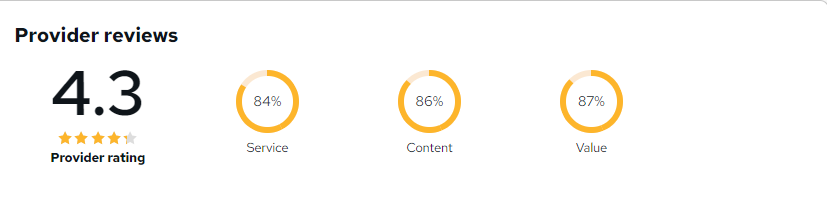
Animation Creator Level 1 Reviews
Excellent
98%
Would Recommend1
Certified Learners100%
Authentic ReviewsA brilliant introduction to animation. The Photoshop techniques were easy to follow and highly practical.
Really enjoyed learning how to create GIFs and simple animations. Great course for beginners.
Perfect for content creators. I've already started using the animation techniques on social media projects.
Curriculum
-
Introduction to Animate in Photoshop!
00:02:00
-
Why Use Photoshop to Animate? How I Use Photoshop in Multimedia. A Case Study
00:03:00
-
Royalty-Free and Public Domain Video Resources
00:03:00
-
Setting Up to Animate in Photoshop: Windows and Tools
00:03:00
-
Importing Your Video and Working With Different Video Formats
00:07:00
-
Make a Quick & Dirty Stop Motion Animation By Adjusting Your Frames Per Second
00:06:00
-
Drawing Right Over Your Video and Making a Simple Frame By Frame Animation
00:04:00
-
Using the Onion Skin Options to Make More Decisive Drawings (Frame By Frame)
00:04:00
-
Use the “Wiggle” Technique to Get More Mileage Out of Your Drawings (Looping)
00:10:00
-
Let’s Have Photoshop Animate For Us (Position, Scaling, Opacity, Rotation, etc.)
00:12:00
-
Rotoscoping and Animating the Frame By Frame Way (*The Essence of How I Work
00:12:00
-
Adding Filters and Other Special Effects to Your Video (For Good or For Evil)
00:06:00
-
Turning a Video Into an Animated Painting With Brushes
00:06:00
-
Exporting the Final Video From Photoshop
00:04:00
-
How to Create a Simple Animated Gif in Photoshop
00:11:00
-
How to Create a Quick & Dirty (But Beautiful) Animated Gif Slideshow
00:09:00
-
Top Social Media Platforms and Websites For Filmmakers and Animators
00:07:00

-
Order Your Certificate
Offer Ends in
-
Duration:1 hour, 49 minutes
-
Access:1 Year
-
Units:18

Reviews

TAKE ALL COURSES FOR £99