GIFT
Data Entry Course Online UK – Data Entry Administrator Training
Build Accurate Data Entry & Excel Skills for Modern Office Roles
Learn how to enter, organise and manage digital information with greater accuracy. This online Data Entry Administrator Training Course covers Excel, spreadsheet management, formulas, worksheet formatting and essential data handling skills for UK workplace settings.
Key Topics Covered :
- ✓ Data Entry Techniques, Accuracy and Digital Records
- ✓ Microsoft Excel for Data Entry and Spreadsheet Management
- ✓ Excel Formulas, Functions and Calculations
- ✓ Worksheet Editing, Formatting and Data Organisation
- ✓ Workbook Management, Page Layout and Printing
What Is Data Entry?
Data entry is the process of entering, updating, checking and organising information within digital systems such as spreadsheets and databases.
A Data Entry Administrator may work with customer records, financial information, orders, documents or other business data. Therefore, accuracy, attention to detail, computer skills and efficient information management are important.
This Data Entry Course introduces these core skills while building confidence with Microsoft Excel and spreadsheet-based tasks.
Following Courses are Included With This Course (For Free) - Limited Time!
GIFT
GIFT
School Administration and SENCO Training
Course Overview
Accurate data helps organisations keep records organised, make informed decisions and run everyday operations efficiently. The Data Entry Administrator Training course is designed to help you develop the digital and administrative skills needed to work confidently with business information.
You will learn key data entry techniques before developing your Microsoft Excel skills. The course covers spreadsheet navigation, calculations, formulas, worksheet editing, formatting, printing and workbook management.
As you progress, you will also strengthen your attention to detail, data organisation and ability to manage information efficiently.
This flexible data entry course online is suitable for beginners, job seekers and existing administrators. So, if you are comparing data entry courses UK or want to improve your Excel and office skills, this course provides a structured place to start.
Learning Outcomes
By completing this Data Entry Training, you will be able to:
- Enter and organise digital information with greater accuracy
- Use Microsoft Excel for data entry and spreadsheet tasks
- Create and apply formulas for common calculations
- Edit, format and organise professional worksheets
- Manage Excel workbooks and worksheet views
- Improve accuracy and attention to detail
- Organise data for easier review and retrieval
- Apply efficient methods to everyday administrative tasks
Why Choose This Data Entry Course?
✓ Build Skills Employers Use Every Day
Data handling is part of many administrative roles. This course develops skills in spreadsheets, records and digital information management that can transfer across different workplace settings.
✓ Learn Microsoft Excel
Excel remains widely used for storing, organising and reviewing business information. Therefore, developing stronger spreadsheet skills can support both data entry and wider administrative work.
✓ Beginner-Friendly Training
No advanced data entry knowledge is needed to start. The course introduces key concepts before moving into formulas, formatting and workbook management.
✓ Study Online at Your Own Pace
Flexible online data entry training allows you to learn around work, family and other commitments.
✓ Strengthen Your CV
Developing recognised digital and administrative skills can help demonstrate your commitment to professional development when applying for entry-level office roles.
Skills and Knowledge You Will Develop
Throughout this Data Entry Administrator Course, you will build knowledge of accurate data input, Excel formulas, spreadsheet formatting, worksheet editing and workbook management. In addition, you will strengthen your digital organisation, attention to detail and administrative efficiency.
Who Is This Course For?
This course is ideal for beginners entering administration, job seekers improving their digital skills, Administrative Assistants, Office Assistants and professionals who regularly use spreadsheets. It is also suitable for learners searching for data entry courses for beginners, flexible data entry courses online UK, or online classes for data entry and Excel skills.
Certificate of Achievement
Earn Your Accredited Certificate with Transcript
Save 20% with the coupon code SKILL20

Show Your Certified Identity with a CPD-QS Certificate
Perfect for employers, clients, or academic verification.

Career Path
Data Entry Clerk — Around £25,000–£42,000/year
Data Entry Clerks enter, check and maintain digital information. Indeed currently reports an average UK salary of about £30,741, with its reported range running from approximately £25,420 to £41,768.
Data Administrator — Around £25,000–£34,000/year
Data Administrators maintain records, spreadsheets and organisational information. The current UK average is approximately £26,516 per year.
Administrative Assistant — £21,000–£28,000/year
Administrative Assistants maintain records, filing systems, correspondence and everyday office processes.
Sales Administrator — £22,000–£28,000/year
Sales Administrators manage orders, records, payments and customer administration.
Database Administrator — £28,000–£62,000/year
With additional technical training and experience, learners may progress towards database administration. This advanced role normally requires database-management and SQL skills beyond basic data entry training.
Turn Better Data Skills Into Greater Career Confidence
Accurate data, organised spreadsheets and strong Excel skills are valuable across modern offices.
Start the Data Entry Administrator Training and build your confidence in data entry, formulas, worksheet management and digital administration through flexible online learning.
Start Your Data Entry Course Today
Frequently Asked Questions (FAQs)
A Data Entry Course teaches you how to enter, organise and manage digital information accurately. This course also develops Excel and spreadsheet skills.
Yes. It introduces core data entry skills before progressing to Excel formulas, worksheet formatting and workbook management.
Yes. This data entry course online UK allows you to study flexibly from home around your existing commitments.
Yes. You will learn Excel navigation, formulas, calculations, worksheet editing, formatting, printing and workbook management.
Accuracy, attention to detail, computer skills, organisation and confidence with spreadsheets are particularly useful.
Relevant roles include Data Entry Clerk, Data Administrator, Administrative Assistant and other office support positions.
Yes. Online classes for data entry can help beginners build spreadsheet and information-management skills before applying them in workplace settings.
Data entry and administrative tasks can be performed remotely in some organisations. However, availability depends on the employer and role.
AI can automate repetitive data entry tasks, but it does not fully replace Data Entry Administrators. Human oversight is essential for data quality control, error checking, and handling complex or sensitive information. In the UK job market, professionals who understand AI data entry software and automation workflows have better career prospects.
Data Entry Administrator Training Reviews
Excellent
98%
Would Recommend174
Certified Learners100%
Authentic ReviewsCurriculum
-
Introduction to Data Entry
00:08:00
-
Using the Computer for Data Entry
00:08:00
-
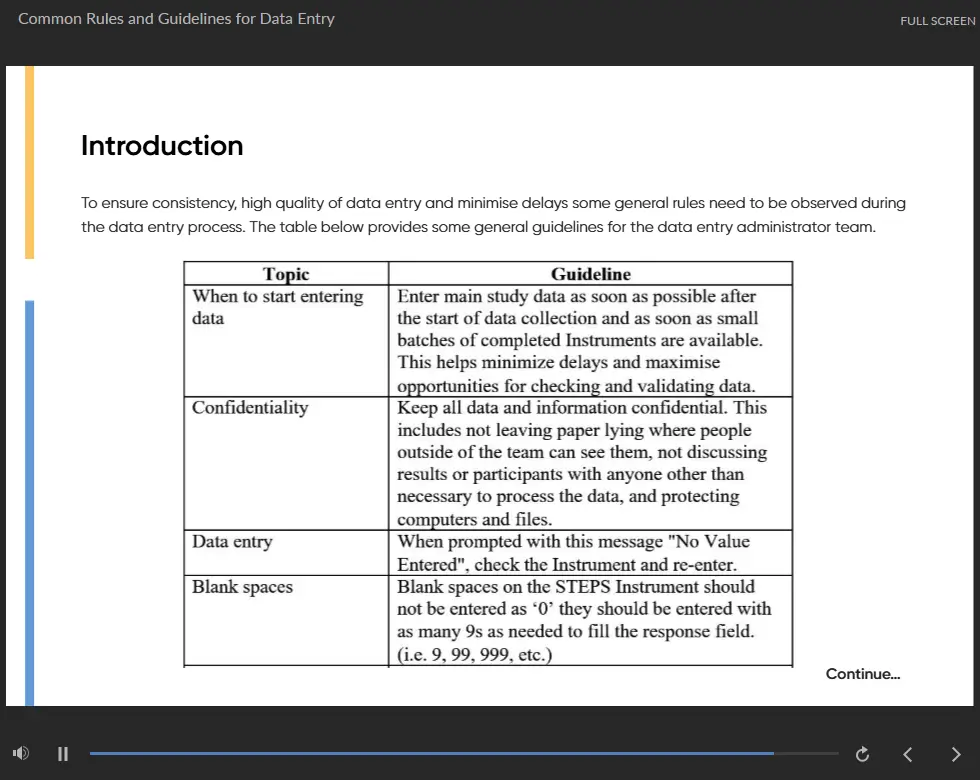
Common Rules and Guidelines for Data Entry
00:16:00
-
Using Excel for Efficient Data Entry
00:10:00
-
Using Excel’s Flash Fill and Autofill to Automate Data Entry
00:13:00
-
How to Create a Data Entry Form in Excel?
00:33:00
-
Using Statistics Packages in Data Entry
00:16:00
-
Navigate the Excel User Interface
00:28:00
-
Use Excel Commands
00:10:00
-
Create and Save a Basic Workbook
00:19:00
-
Enter Cell Data
00:12:00
-
Use Excel Help
00:05:00
-
Create Worksheet Formulas
00:15:00
-
Insert Functions
00:17:00
-
Reuse Formulas and Functions
00:17:00
-
Insert, Delete, and Adjust Cells, Columns, and Rows
00:10:00
-
Search for and Replace Data
00:09:00
-
Use Proofing and Research Tools
00:07:00
-
Apply Text Formats
00:16:00
-
Apply Number Format
00:08:00
-
Align Cell Contents
00:09:00
-
Apply Styles and Themes
00:12:00
-
Apply Basic Conditional Formatting
00:11:00
-
Create and Use Templates
00:08:00
-
Preview and Print a Workbook
00:10:00
-
Set Up the Page Layout
00:09:00
-
Configure Headers and Footers
00:07:00
-
Manage Worksheets
00:05:00
-
Manage Workbook and Worksheet Views
00:07:00
-
Manage Workbook Properties
00:06:00
-
Order Your Certificate
Offer Ends in
Or

TAKE ALL COURSES FOR £99
14-Day Money-Back Guarantee
-
Duration:6 hours, 1 minute
-
Access:1 Year
-
Units:31

6 Reviews