
Overview: Windows Server 2008 R2 – Complete Video Training
- Â Install and configure Active Directory Domain Services (AD DS)
- Â Manage users, groups, and organisational units within Active Directory
- Â Â Configure Group Policy Objects (GPOs) for security and system control
- Â Â Set up DNS, DHCP, and IP addressing for enterprise networks
- Â Â Understand domain controllers, replication, and site management
- Â Â Implement network security using IPSec, firewall, and authentication policies
- Â Â Manage file services, backups, and disaster recovery processes
- Â Â Monitor system performance, logs, and network activity
- Â Â Deploy Windows Server services and updates using WSUS
What Is Windows Server 2008 R2 – Complete Video Training?
The Windows Server 2008 R2 – Complete Video Training focuses on system administration, network configuration, and enterprise-level server management. It explains how Windows Server environments are installed, configured, secured, and maintained. In this course, learners explore Active Directory services, including user and group management, domain controllers, and organisational structures. The training also covers Group Policy management, enabling centralised control over system settings and security policies. The course includes networking concepts such as IP addressing, DNS, DHCP, and routing. Learners also study authentication methods, auditing, and system monitoring to maintain secure and efficient server operations. By the end of the course, learners develop knowledge of Windows Server infrastructure, administrative tools, and network services required to manage enterprise IT systems.
Course Description
The course begins with installation and configuration of Active Directory Domain Services. Learners explore how to install server roles, configure domain controllers, and manage directory objects such as users, groups, and computers.
As the course progresses, learners work with Group Policy Objects to control system behaviour, deploy software, and enforce security policies. This section explains how policies are created, applied, and verified within enterprise environments.
Networking modules focus on DNS, DHCP, IP addressing, and routing. Learners understand how networks communicate, how name resolution works, and how IP-based services are configured and managed.
Security and monitoring modules introduce authentication policies, auditing, firewall configuration, and IPSec. Learners also explore backup strategies, disaster recovery planning, and system performance monitoring.
The course concludes with advanced topics such as Active Directory Federation Services, certificate services, replication, and enterprise deployment planning, providing a complete overview of Windows Server administration.
Learning Outcome
- Understand the structure and functions of Windows Server environments
- Install and configure Active Directory Domain Services
- Manage users, groups, and organisational units in Active Directory
- Configure and apply Group Policy Objects for system control
- Set up DNS and DHCP services for network management
- Understand IP addressing, routing, and network communication
- Implement authentication and security policies
Who Is This Course For?
- Aspiring system administrators and IT support professionals
- Network administrators managing enterprise systems
- Students interested in server and network infrastructure
- IT professionals seeking knowledge of Windows Server environments
- Individuals preparing for system administration roles
Why Enrol in This Windows Server Course?
Modern organisations rely heavily on server infrastructure to manage networks, users, and applications. This windows server course provides structured training that explains how these systems are configured and maintained.
The course covers key administrative tools, networking concepts, and security practices used in enterprise environments. Learners follow step-by-step modules that explain how to manage servers efficiently.
Completing this training improves career opportunities in IT support, network administration, and system management roles. It also provides a strong foundation for further certifications and advanced server technologies.
Windows Server Course Career Path
Knowledge of Windows Server systems supports various roles in IT infrastructure and network management.
Typical career pathways include:
IT Support Technician — £22,000–£30,000
Provides technical support and maintains IT systems.
System Administrator — £30,000–£45,000
Manages servers, networks, and user systems.
Network Administrator — £32,000–£50,000
Maintains network infrastructure and connectivity.
Infrastructure Engineer — £40,000–£60,000
Designs and manages enterprise IT systems.
IT Systems Engineer — £45,000–£65,000
Handles advanced server configurations and enterprise solutions.
Enrol Today – Build Windows Server Skills
By enrolling in this windows server course, learners build knowledge required for managing enterprise server environments and network systems.
Strong server administration knowledge supports efficient IT operations, improved system security, and reliable network performance.
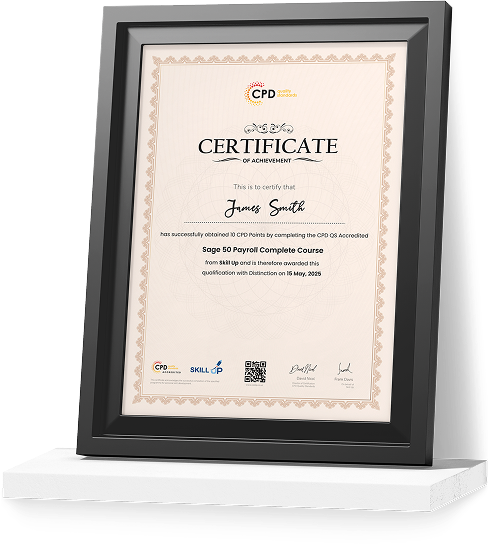
Certificate of Achievement
Upon successfully completing Windows Server 2008 R2 – Complete Video Training, learners will receive an Accredited Certificate confirming their knowledge of server administration and network configuration.
We provide two recognised certificate options:
CPD-QS Certificate
Learners can obtain a certificate accredited by CPD Quality Standards (CPD-QS), supporting professional development in IT and system administration.
SKILL UP Brand Recognised Certificate
Learners will also receive a SKILL UP Certificate of Completion, confirming successful completion of the course and achievement of learning outcomes.
Earn Your Accredited Certificate with Transcript
Save 20% with the coupon code SKILL20

Show Your Certified Identity with a CPD-QS Certificate
Perfect for employers, clients, or academic verification.
Frequently Asked Questions
The course is fully online and self-paced, typically completed within 6–8 weeks.
 Basic IT knowledge is helpful, but beginners can also follow the structured modules.
 Yes, learners receive a recognised certificate confirming course completion.
Yes, it builds foundational knowledge applicable to current server technologies and infrastructure.
Yes, it supports roles in IT support, system administration, and network management.
Windows Server 2008 R2 – Complete Video Training Reviews
Excellent
98%
Would Recommend95
Certified Learners100%
Authentic Reviews
A well-organised and highly valuable course with clear, easy-to-understand guidance throughout. I’ve gained knowledge that’s directly relevant to my day-to-day responsibilities. It’s given me greater confidence in applying these skills professionally.
Engaging content delivered in a straightforward and structured format. The examples were realistic and helped reinforce key concepts effectively. I would certainly recommend it to colleagues looking to upskill
Comprehensive, insightful and professionally presented from start to finish. The course materials were clear and well supported. A worthwhile investment for anyone serious about career development
Curriculum
-
What is IDA?
00:16:00
-
How to Install the AD DS Role
00:11:00
-
The New Windows 2008 Server Core
00:09:00
-
Installing AD DS Server Core
00:02:00
-
Working with the MMC
00:19:00
-
Working with Objects in Active Directory
00:12:00
-
How to Search Through Active Directory
00:07:00
-
Securing and Delegating AD Objects
00:12:00
-
Adding Computer Accounts to AD
00:08:00
-
Organizing AD with Container Objects
00:13:00
-
Working With Computer Objects and Accounts
00:17:00
-
Using Group Policy
00:04:00
-
What Are Group Policy Objects
00:21:00
-
Restricted Group Policies
00:02:00
-
Analyzing Security Settings
00:12:00
-
Using The Security Configuration Wizard
00:05:00
-
Deploying Software with Group Policy
00:10:00
-
Understanding Group Policy Scope
00:11:00
-
How Group Policy Settings are Processed
00:09:00
-
Verifying Group Policy Settings
00:05:00
-
Enabling Auditing
00:13:00
-
Automating User Account Creation
00:10:00
-
Working with User Attributes
00:15:00
-
User Account Administrative Tasks
00:05:00
-
Using PowerShell to Create User Accounts
00:09:00
-
Creation and Management
00:08:00
-
The Basics of Groups
00:25:00
-
Best Practices for Using AD Groups
00:08:00
-
Automating Group Creation
00:05:00
-
Advanced Group Options
00:09:00
-
Installation Options
00:06:00
-
How to Install a Domain Controller
00:06:00
-
Introducing the Operations Masters
00:11:00
-
Designing Where to Deploy the Operation Masters
00:14:00
-
SYSVOL Replication with DFS
00:02:00
-
DNS Basics
00:15:00
-
DNS Definitions and Terms
00:17:00
-
Setting up DNS for the Enterprise
00:09:00
-
Password Security Policies
00:15:00
-
Introducing the Read-Only Domain Controller
00:06:00
-
Installing the RODC
00:05:00
-
Auditing Authentication Events
00:03:00
-
Preparing for Recovery
00:10:00
-
Active Directory Tools
00:24:00
-
Monitoring Active Directory Performance
00:11:00
-
What Are Sites
00:27:00
-
Deciding on Site Boundaries
00:07:00
-
Working with Global Catalog Placement with AD Partitions
00:09:00
-
Controlling Replication Between Sites
00:20:00
-
Managing the Global Catalog
00:04:00
-
Configuring AD Trust Relationships
00:32:00
-
Choosing the Domain and Forest Functional Levels
00:07:00
-
Understanding AD FS
00:10:00
-
Installing AD FS
00:01:00
-
Configuring and Using AD FS
00:03:00
-
Understanding AD RMS
00:10:00
-
Installing AD RMS
00:03:00
-
Configuring and Using AD RMS
00:07:00
-
Understanding AD LDS
00:08:00
-
Installing AD LDS
00:02:00
-
Configuring and Using AD LDS
00:07:00
-
Security Review
00:04:00
-
Understanding AD CS
00:29:00
-
Installing AD CS
00:02:00
-
Configuring and Using AD CS
00:08:00
-
Introducing the OSI Model
00:24:00
-
How IPv4 Works
00:26:00
-
Subnets and Supernets
00:25:00
-
What’s New with IPv6
00:10:00
-
Configuring Windows with an IPv4 Address
00:28:00
-
Why Use a DHCP Server
00:59:00
-
Creating DHCP Servers for Your Network
00:19:00
-
How Windows Performs Name to IP Resolution
00:15:00
-
Configuring Windows to Use DNS
00:23:00
-
How Does DNS Really Work
00:17:00
-
Deploying DNS Servers
00:35:00
-
DNS Configurable Options
00:15:00
-
Managing Different Types of DNS Zones
00:29:00
-
Configuring Zone Replication and Transfers
00:25:00
-
Routing Explained
00:29:00
-
Router Communication Protocols
00:51:00
-
NAT Explained
00:11:00
-
Making NAT Work
00:07:00
-
Remote Access to Other Networks
00:20:00
-
WiFi Basics
00:51:00
-
Communication Security: IPSec
00:33:00
-
Enforcing IPSec with Policies
01:04:00
-
Network Security with NAP
00:28:00
-
Client Security with Windows Firewall
01:02:00
-
Other Security Solutions
00:29:00
-
Working with File Security
00:15:00
-
Server Role – File Services
00:23:00
-
Using DFS
00:36:00
-
Using EFS
00:41:00
-
Performing a Backup and Restore
00:17:00
-
How to Install and Use Network Monitor and SNMP
00:37:00
-
Windows Performance and Reliability Monitoring
00:36:00
-
Looking at Event Logs
00:06:00
-
Configuring Event Forwarding
00:27:00
-
Server Role – Print Services
00:04:00
-
How to Share Printers
00:35:00
-
What is Windows Server Update Services?
00:10:00
-
Planning & Deploying the WSUS Installation
00:06:00
-
Using Windows Server Update Services
00:22:00
-
Using WSUS
00:11:00
-
Order Your Certificate

Offer Ends in
-
Duration:1 day, 4 hours
-
Access:1 Year
-
Units:106

9 Reviews

TAKE ALL COURSES FOR £99




